本文最后更新于85 天前,其中的信息可能已经过时,如有错误请发送邮件到2426250897@qq.com

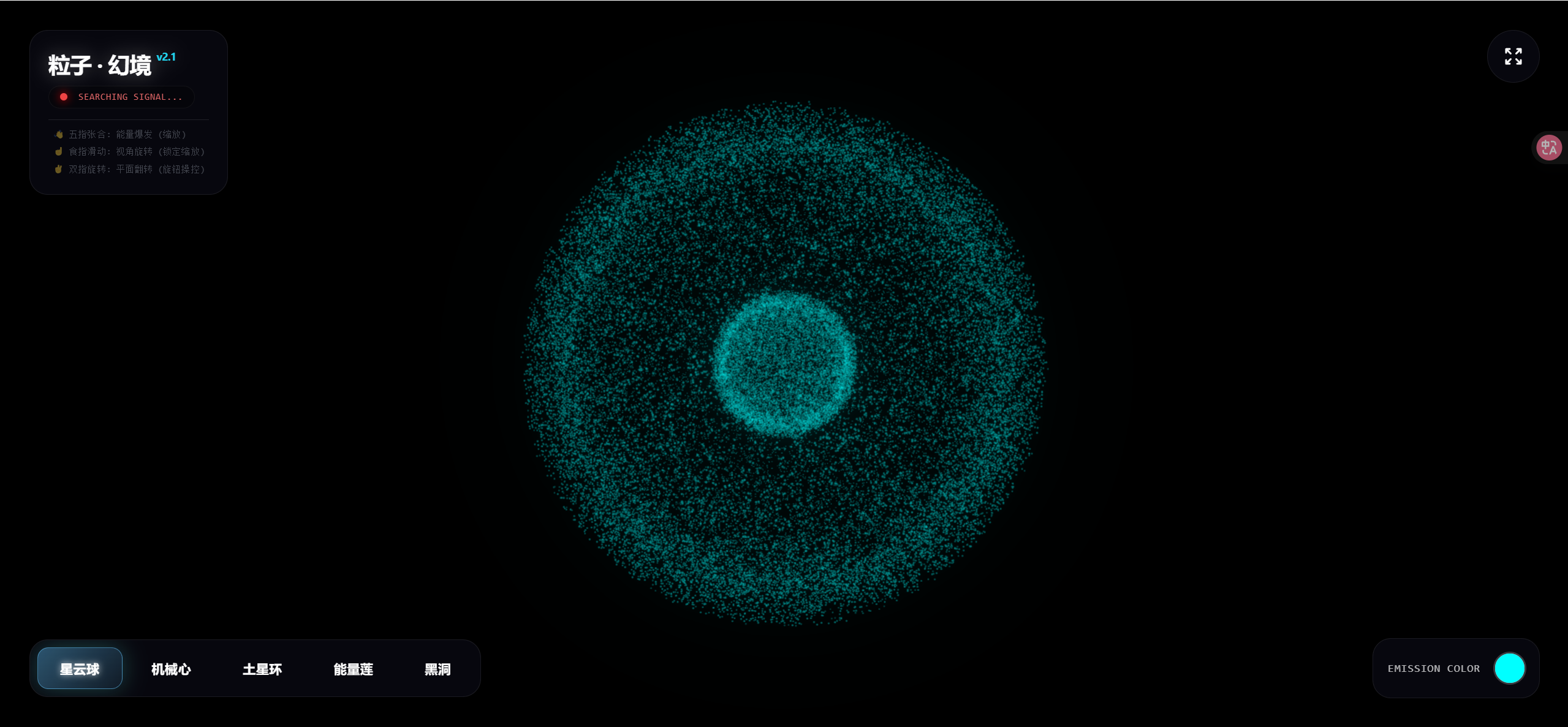
这个3D粒子系统是通过gemini3实现的,只需要输入下面的提示词即可生成。具体细节可参考上图进行微调。最后我把生成好的代码也放在了下面。
提示词
用Three.js创建一个实时交互的3D粒子系统。要求:
1.通过摄像头检测双手张合控制粒子群的缩放与扩散
2.提供U面板可选择爱心/花朵土星/佛像/烟花等模型
3.支持颜色选择器调整粒子颜色
4.粒子需实时响应手势变化
5.界面简洁现代,包含全屏控制按钮
<!DOCTYPE html>
<html lang="zh-CN">
<head>
<meta charset="UTF-8">
<meta name="viewport" content="width=device-width, initial-scale=1.0">
<title>3D 粒子手势交互系统 v2.1 - 双指旋钮操控版</title>
<script src="https://cdn.tailwindcss.com"></script>
<script async src="https://unpkg.com/es-module-shims@1.6.3/dist/es-module-shims.js"></script>
<script type="importmap">
{
"imports": {
"three": "https://cdn.jsdelivr.net/npm/three@0.154.0/build/three.module.js",
"three/addons/": "https://cdn.jsdelivr.net/npm/three@0.154.0/examples/jsm/"
}
}
</script>
<!-- MediaPipe Hands -->
<script src="https://cdn.jsdelivr.net/npm/@mediapipe/camera_utils/camera_utils.js" crossorigin="anonymous"></script>
<script src="https://cdn.jsdelivr.net/npm/@mediapipe/control_utils/control_utils.js"
crossorigin="anonymous"></script>
<script src="https://cdn.jsdelivr.net/npm/@mediapipe/drawing_utils/drawing_utils.js"
crossorigin="anonymous"></script>
<script src="https://cdn.jsdelivr.net/npm/@mediapipe/hands/hands.js" crossorigin="anonymous"></script>
<style>
body {
margin: 0;
overflow: hidden;
background-color: #020205;
font-family: 'Segoe UI', sans-serif;
}
#canvas-container {
position: absolute;
top: 0;
left: 0;
width: 100%;
height: 100%;
z-index: 1;
}
#video-element {
display: none;
}
.glass-panel {
background: rgba(10, 10, 20, 0.7);
backdrop-filter: blur(16px);
-webkit-backdrop-filter: blur(16px);
border: 1px solid rgba(255, 255, 255, 0.08);
border-radius: 20px;
box-shadow: 0 8px 32px rgba(0, 0, 0, 0.6);
}
.control-btn {
transition: all 0.4s cubic-bezier(0.4, 0, 0.2, 1);
position: relative;
overflow: hidden;
}
.control-btn:hover {
background: rgba(255, 255, 255, 0.15);
transform: translateY(-2px);
box-shadow: 0 0 20px rgba(255, 255, 255, 0.1);
}
.control-btn.active {
background: linear-gradient(135deg, rgba(100, 200, 255, 0.4), rgba(100, 200, 255, 0.1));
border: 1px solid rgba(100, 200, 255, 0.5);
box-shadow: 0 0 25px rgba(79, 209, 197, 0.3);
text-shadow: 0 0 8px rgba(255, 255, 255, 0.8);
}
.loader {
border: 3px solid rgba(255, 255, 255, 0.1);
border-left-color: #00ffff;
border-radius: 50%;
width: 50px;
height: 50px;
animation: spin 0.8s cubic-bezier(0.5, 0.1, 0.5, 0.9) infinite;
}
@keyframes spin {
0% {
transform: rotate(0deg);
}
100% {
transform: rotate(360deg);
}
}
.custom-scroll::-webkit-scrollbar {
height: 4px;
}
.custom-scroll::-webkit-scrollbar-track {
background: rgba(0, 0, 0, 0.2);
border-radius: 4px;
}
.custom-scroll::-webkit-scrollbar-thumb {
background: rgba(255, 255, 255, 0.15);
border-radius: 4px;
}
.custom-scroll::-webkit-scrollbar-thumb:hover {
background: rgba(255, 255, 255, 0.3);
}
.mode-item {
transition: all 0.2s ease;
opacity: 0.4;
transform: scale(0.95);
font-weight: normal;
}
.mode-item.active {
opacity: 1;
transform: scale(1.0);
color: #22d3ee;
font-weight: bold;
text-shadow: 0 0 10px rgba(34, 211, 238, 0.4);
}
</style>
</head>
<body>
<div id="canvas-container"></div>
<video id="video-element" playsinline></video>
<!-- Loading -->
<div id="loader-overlay"
class="fixed inset-0 z-50 flex flex-col items-center justify-center bg-black bg-opacity-95 transition-opacity duration-700">
<div class="loader mb-6 shadow-[0_0_30px_rgba(0,255,255,0.3)]"></div>
<div
class="text-transparent bg-clip-text bg-gradient-to-r from-cyan-300 to-blue-500 text-2xl font-bold tracking-widest uppercase">
Visual Core</div>
<div class="text-gray-500 text-xs mt-3 tracking-widest">INITIALIZING PARTICLE ENGINE v2.1</div>
</div>
<!-- UI -->
<div class="absolute top-0 left-0 w-full h-full pointer-events-none z-10 p-4 md:p-8 flex flex-col justify-between">
<div class="flex justify-between items-start pointer-events-auto">
<div class="glass-panel p-5 animate-fade-in-down transform transition-all hover:scale-105 duration-500">
<h1
class="text-white text-2xl font-bold tracking-tight mb-2 drop-shadow-[0_0_10px_rgba(255,255,255,0.3)]">
粒子 · 幻境 <span class="text-xs text-cyan-400 align-top">v2.1</span></h1>
<div class="flex items-center gap-3 bg-black/30 rounded-full px-3 py-1 w-fit border border-white/5">
<div id="status-dot"
class="w-2 h-2 rounded-full bg-red-500 transition-all duration-500 shadow-[0_0_10px_red]"></div>
<span id="status-text" class="text-[10px] text-gray-300 font-mono uppercase tracking-wider">System
Offline</span>
</div>
<div class="text-[10px] text-gray-400 mt-3 font-mono border-t border-white/10 pt-2 flex flex-col gap-1">
<div id="mode-scale" class="mode-item">👋 五指张合: 能量爆发 (缩放)</div>
<div id="mode-rotate" class="mode-item">☝️ 食指滑动: 视角旋转 (锁定缩放)</div>
<div id="mode-roll" class="mode-item">✌️ 双指旋转: 平面翻转 (旋钮操控)</div>
</div>
</div>
<button onclick="toggleFullScreen()"
class="glass-panel p-4 text-white hover:text-cyan-300 control-btn rounded-full group">
<svg xmlns="http://www.w3.org/2000/svg" class="h-6 w-6 group-hover:scale-110 transition-transform"
fill="none" viewBox="0 0 24 24" stroke="currentColor">
<path stroke-linecap="round" stroke-linejoin="round" stroke-width="2"
d="M4 8V4m0 0h4M4 4l5 5m11-1V4m0 0h-4m4 0l-5 5M4 16v4m0 0h4m-4 0l5-5m11 5l-5-5m5 5v-4m0 4h-4" />
</svg>
</button>
</div>
<div
class="pointer-events-auto flex flex-col md:flex-row gap-6 items-end md:items-center justify-between w-full">
<div class="glass-panel p-2 flex gap-2 overflow-x-auto max-w-full custom-scroll">
<button onclick="changeShape('sphere')"
class="control-btn active px-6 py-3 rounded-xl text-sm text-white font-semibold whitespace-nowrap tracking-wide"
data-shape="sphere">星云球</button>
<button onclick="changeShape('heart')"
class="control-btn px-6 py-3 rounded-xl text-sm text-white font-semibold whitespace-nowrap tracking-wide"
data-shape="heart">机械心</button>
<button onclick="changeShape('saturn')"
class="control-btn px-6 py-3 rounded-xl text-sm text-white font-semibold whitespace-nowrap tracking-wide"
data-shape="saturn">土星环</button>
<button onclick="changeShape('lotus')"
class="control-btn px-6 py-3 rounded-xl text-sm text-white font-semibold whitespace-nowrap tracking-wide"
data-shape="lotus">能量莲</button>
<button onclick="changeShape('galaxy')"
class="control-btn px-6 py-3 rounded-xl text-sm text-white font-semibold whitespace-nowrap tracking-wide"
data-shape="galaxy">黑洞</button>
</div>
<div class="glass-panel p-4 flex items-center gap-4 hover:bg-white/10 transition-colors">
<span class="text-white text-xs font-mono tracking-wider uppercase opacity-70">Emission Color</span>
<div
class="relative w-8 h-8 rounded-full overflow-hidden ring-2 ring-white/20 hover:ring-cyan-400 transition-all">
<input type="color" id="color-picker" value="#00ffff"
class="absolute -top-1/2 -left-1/2 w-[200%] h-[200%] cursor-pointer p-0 m-0 border-0"
onchange="updateColor(this.value)">
</div>
</div>
</div>
</div>
<script type="module">
import * as THREE from 'three';
import { OrbitControls } from 'three/addons/controls/OrbitControls.js';
import { EffectComposer } from 'three/addons/postprocessing/EffectComposer.js';
import { RenderPass } from 'three/addons/postprocessing/RenderPass.js';
import { UnrealBloomPass } from 'three/addons/postprocessing/UnrealBloomPass.js';
// --- Configuration ---
const PARTICLE_COUNT = 45000;
const PARTICLE_SIZE = 0.18;
const SATURN_BODY_RATIO = 0.3;
// State
let scene, camera, renderer, composer, particles, controls;
let targetPositions = [];
let targetColors = [];
let currentShape = 'sphere';
let handInfluence = 0;
let isHandDetected = false;
let clock = new THREE.Clock();
// Color State
let userBaseColor = new THREE.Color(0x00ffff);
// 旋转交互变量
let previousFingerPos = { x: 0, y: 0 };
let smoothedFingerPos = { x: 0, y: 0 };
let rotationVelocity = { x: 0, y: 0, z: 0 };
let isTrackingRotation = false;
// 【新增】双指旋钮交互变量
let isTrackingRoll = false;
let smoothedIndexTip = { x: 0, y: 0 };
let smoothedMiddleTip = { x: 0, y: 0 };
let previousRollAngle = 0;
// 缩放交互变量
let currentGestureMode = 'none';
// 模式锁定与信号防抖
let currentStableMode = 'scale';
let modeFrameCounter = 0;
let lastTimeHandDetected = 0;
async function init() {
// 1. Scene & Camera
scene = new THREE.Scene();
scene.fog = new THREE.FogExp2(0x020205, 0.02);
camera = new THREE.PerspectiveCamera(60, window.innerWidth / window.innerHeight, 0.1, 1000);
camera.position.z = 30;
camera.position.y = 0;
// 2. Renderer
renderer = new THREE.WebGLRenderer({ antialias: false, alpha: true, powerPreference: "high-performance" });
renderer.setSize(window.innerWidth, window.innerHeight);
renderer.setPixelRatio(Math.min(window.devicePixelRatio, 1.5));
renderer.toneMapping = THREE.ReinhardToneMapping;
document.getElementById('canvas-container').appendChild(renderer.domElement);
// 3. Post Processing (BLOOM)
const renderScene = new RenderPass(scene, camera);
const bloomPass = new UnrealBloomPass(new THREE.Vector2(window.innerWidth, window.innerHeight), 1.5, 0.4, 0.85);
bloomPass.threshold = 0.05;
bloomPass.strength = 1.4;
bloomPass.radius = 0.6;
composer = new EffectComposer(renderer);
composer.addPass(renderScene);
composer.addPass(bloomPass);
// 4. Controls
controls = new OrbitControls(camera, renderer.domElement);
controls.enableDamping = true;
controls.dampingFactor = 0.05;
controls.autoRotate = true;
controls.autoRotateSpeed = 0.5;
controls.enableZoom = true;
// 5. Build World
createParticles();
await setupMediaPipe();
window.addEventListener('resize', onWindowResize);
animate();
}
function createParticles() {
const geometry = new THREE.BufferGeometry();
const positions = new Float32Array(PARTICLE_COUNT * 3);
const colors = new Float32Array(PARTICLE_COUNT * 3);
const sphere = getShapePositions('sphere');
const initialColors = getShapeColors('sphere');
for (let i = 0; i < PARTICLE_COUNT; i++) {
positions[i * 3] = sphere[i * 3];
positions[i * 3 + 1] = sphere[i * 3 + 1];
positions[i * 3 + 2] = sphere[i * 3 + 2];
colors[i * 3] = initialColors[i * 3];
colors[i * 3 + 1] = initialColors[i * 3 + 1];
colors[i * 3 + 2] = initialColors[i * 3 + 2];
}
geometry.setAttribute('position', new THREE.BufferAttribute(positions, 3));
geometry.setAttribute('color', new THREE.BufferAttribute(colors, 3));
const sprite = createParticleTexture();
const material = new THREE.PointsMaterial({
size: PARTICLE_SIZE,
map: sprite,
color: userBaseColor,
transparent: true,
opacity: 0.8,
blending: THREE.AdditiveBlending,
depthWrite: false,
sizeAttenuation: true,
vertexColors: true
});
particles = new THREE.Points(geometry, material);
scene.add(particles);
targetPositions = Float32Array.from(sphere);
targetColors = Float32Array.from(initialColors);
}
function createParticleTexture() {
const canvas = document.createElement('canvas');
canvas.width = 32; canvas.height = 32;
const context = canvas.getContext('2d');
const gradient = context.createRadialGradient(16, 16, 0, 16, 16, 16);
gradient.addColorStop(0, 'rgba(255,255,255,1)');
gradient.addColorStop(0.4, 'rgba(255,255,255,0.5)');
gradient.addColorStop(1, 'rgba(0,0,0,0)');
context.fillStyle = gradient;
context.fillRect(0, 0, 32, 32);
return new THREE.CanvasTexture(canvas);
}
function getShapeColors(type) {
const cols = new Float32Array(PARTICLE_COUNT * 3);
for (let i = 0; i < PARTICLE_COUNT; i++) {
let brightness = 0.2 + Math.random() * 0.8;
let r, g, b;
if (type === 'saturn') {
if (i < PARTICLE_COUNT * SATURN_BODY_RATIO) {
r = 1.0; g = 0.7; b = 0.3;
} else {
r = 0.6; g = 0.8; b = 1.0;
}
r *= brightness; g *= brightness; b *= brightness;
} else {
r = brightness; g = brightness; b = brightness;
}
cols[i * 3] = r;
cols[i * 3 + 1] = g;
cols[i * 3 + 2] = b;
}
return cols;
}
function getShapePositions(type) {
const pos = new Float32Array(PARTICLE_COUNT * 3);
for (let i = 0; i < PARTICLE_COUNT; i++) {
let x, y, z;
if (type === 'sphere') {
const r = 10 + Math.random() * 2;
const theta = Math.random() * Math.PI * 2;
const phi = Math.acos(2 * Math.random() - 1);
x = r * Math.sin(phi) * Math.cos(theta);
y = r * Math.sin(phi) * Math.sin(theta);
z = r * Math.cos(phi);
if (i < PARTICLE_COUNT * 0.2) { x *= 0.3; y *= 0.3; z *= 0.3; }
}
else if (type === 'heart') {
const t = Math.PI - 2 * Math.PI * Math.random();
const u = 2 * Math.PI * Math.random();
x = 16 * Math.pow(Math.sin(t), 3);
y = 13 * Math.cos(t) - 5 * Math.cos(2 * t) - 2 * Math.cos(3 * t) - Math.cos(4 * t);
z = 6 * Math.cos(t) * Math.sin(u) * Math.sin(t);
const scale = 0.6;
x *= scale; y *= scale; z *= scale;
if (Math.random() > 0.8) { x *= 1.1; y *= 1.1; z *= 1.1; }
}
else if (type === 'saturn') {
if (i < PARTICLE_COUNT * SATURN_BODY_RATIO) {
const r = 5.5;
const theta = Math.random() * Math.PI * 2;
const phi = Math.acos(2 * Math.random() - 1);
x = r * Math.sin(phi) * Math.cos(theta);
y = r * 0.9 * Math.sin(phi) * Math.sin(theta);
z = r * Math.cos(phi);
} else {
const angle = Math.random() * Math.PI * 2;
const ringSelector = Math.random();
let r, thickness;
if (ringSelector < 0.45) {
r = 7 + Math.random() * 3.5; thickness = 0.2;
} else if (ringSelector < 0.5) {
r = 10.5 + Math.random() * 1.5; thickness = 0.1;
if (Math.random() > 0.2) { x = 0; y = 0; z = 0; pos[i * 3] = x; pos[i * 3 + 1] = y; pos[i * 3 + 2] = z; continue; }
} else {
r = 12 + Math.random() * 5; thickness = 0.4;
}
r += (Math.random() - 0.5) * 0.3;
x = r * Math.cos(angle);
y = (Math.random() - 0.5) * thickness;
z = r * Math.sin(angle);
const tilt = 0.4;
const y_new = y * Math.cos(tilt) - x * Math.sin(tilt);
const x_new = y * Math.sin(tilt) + x * Math.cos(tilt);
x = x_new; y = y_new;
}
}
else if (type === 'lotus') {
const u = Math.random() * Math.PI * 2;
const v = Math.random();
const petals = 7;
const rBase = 8 * (0.5 + 0.5 * Math.pow(Math.sin(petals * u * 0.5), 2)) * v;
x = rBase * Math.cos(u);
z = rBase * Math.sin(u);
y = 4 * Math.pow(v, 2) - 2;
if (i < PARTICLE_COUNT * 0.15) { x = (Math.random() - 0.5); z = (Math.random() - 0.5); y = (Math.random() - 0.5) * 10; }
}
else if (type === 'galaxy') {
const arms = 3;
const spin = i % arms;
const angleOffset = (spin / arms) * Math.PI * 2;
const dist = Math.pow(Math.random(), 0.5);
const r = dist * 20;
const angle = dist * 10 + angleOffset;
x = r * Math.cos(angle);
z = r * Math.sin(angle);
y = (Math.random() - 0.5) * (15 - r) * 0.2;
if (r < 2) y *= 0.2;
}
pos[i * 3] = x;
pos[i * 3 + 1] = y;
pos[i * 3 + 2] = z;
}
return pos;
}
function animate() {
requestAnimationFrame(animate);
const time = clock.getElapsedTime();
const positions = particles.geometry.attributes.position.array;
const colors = particles.geometry.attributes.color.array;
let targetScaleBase = 1.0;
let targetParticleSize = PARTICLE_SIZE;
let turbulence = 0.05;
// 【模式应用】
if (isHandDetected) {
targetScaleBase = 0.2 + (handInfluence * 2.3);
turbulence = 0.02 + (handInfluence * 0.3);
targetParticleSize = PARTICLE_SIZE * (0.8 + handInfluence * 2.5);
} else {
targetScaleBase = 1.0 + Math.sin(time * 1.5) * 0.05;
targetParticleSize = PARTICLE_SIZE * (1.0 + Math.sin(time * 1.5) * 0.15);
}
if (particles && particles.material) {
particles.material.size = THREE.MathUtils.lerp(particles.material.size, targetParticleSize, 0.1);
const camRight = new THREE.Vector3(1, 0, 0).applyQuaternion(camera.quaternion).normalize();
const camUp = new THREE.Vector3(0, 1, 0).applyQuaternion(camera.quaternion).normalize();
const camForward = new THREE.Vector3(0, 0, -1).applyQuaternion(camera.quaternion).normalize();
particles.rotateOnWorldAxis(camUp, rotationVelocity.y);
particles.rotateOnWorldAxis(camRight, rotationVelocity.x);
particles.rotateOnWorldAxis(camForward, rotationVelocity.z);
const MAX_SPEED = 0.06;
const MAX_ROLL_SPEED = 0.035;
rotationVelocity.x = THREE.MathUtils.clamp(rotationVelocity.x, -MAX_SPEED, MAX_SPEED);
rotationVelocity.y = THREE.MathUtils.clamp(rotationVelocity.y, -MAX_SPEED, MAX_SPEED);
rotationVelocity.z = THREE.MathUtils.clamp(rotationVelocity.z, -MAX_ROLL_SPEED, MAX_ROLL_SPEED);
rotationVelocity.x *= 0.92;
rotationVelocity.y *= 0.92;
rotationVelocity.z *= 0.96;
}
const lerpSpeed = 0.06;
const colorLerpSpeed = 0.03;
for (let i = 0; i < PARTICLE_COUNT; i++) {
const idx = i * 3;
let tx = targetPositions[idx];
let ty = targetPositions[idx + 1];
let tz = targetPositions[idx + 2];
const dist = Math.sqrt(tx * tx + ty * ty + tz * tz);
const normalizedDist = Math.min(dist / 20.0, 1.0);
let distanceExpansionBoost = 1.0;
if (isHandDetected) {
distanceExpansionBoost = 1.0 + (handInfluence * Math.pow(normalizedDist, 1.5) * 2.0);
}
const finalScale = targetScaleBase * distanceExpansionBoost;
tx *= finalScale; ty *= finalScale; tz *= finalScale;
if (currentShape === 'galaxy') {
const angle = time * (0.1 + (1.0 - (Math.sqrt(tx * tx + tz * tz) / 20)) * 0.5);
const cos = Math.cos(angle); const sin = Math.sin(angle);
const rx = tx * cos - tz * sin;
const rz = tx * sin + tz * cos;
tx = rx; tz = rz;
} else if (currentShape === 'lotus') {
ty += Math.sin(time + tx) * 0.5;
} else {
tx += Math.sin(time * 2 + i) * turbulence;
ty += Math.cos(time * 3 + i) * turbulence;
tz += Math.sin(time * 4 + i) * turbulence;
}
positions[idx] += (tx - positions[idx]) * lerpSpeed;
positions[idx + 1] += (ty - positions[idx + 1]) * lerpSpeed;
positions[idx + 2] += (tz - positions[idx + 2]) * lerpSpeed;
if (targetColors.length > 0) {
colors[idx] += (targetColors[idx] - colors[idx]) * colorLerpSpeed;
colors[idx + 1] += (targetColors[idx + 1] - colors[idx + 1]) * colorLerpSpeed;
colors[idx + 2] += (targetColors[idx + 2] - colors[idx + 2]) * colorLerpSpeed;
}
if (Math.random() > 0.9995) {
colors[idx] = 2.0; colors[idx + 1] = 2.0; colors[idx + 2] = 2.0;
}
if (colors[idx] > 1.5) {
colors[idx] *= 0.9; colors[idx + 1] *= 0.9; colors[idx + 2] *= 0.9;
}
}
particles.geometry.attributes.position.needsUpdate = true;
particles.geometry.attributes.color.needsUpdate = true;
if (!isHandDetected) {
controls.autoRotate = true;
controls.autoRotateSpeed = 1.0;
} else {
controls.autoRotate = false;
}
controls.update();
composer.render();
}
async function setupMediaPipe() {
const videoElement = document.getElementById('video-element');
const statusDot = document.getElementById('status-dot');
const statusText = document.getElementById('status-text');
const modeScaleText = document.getElementById('mode-scale');
const modeRotateText = document.getElementById('mode-rotate');
const modeRollText = document.getElementById('mode-roll');
const hands = new Hands({
locateFile: (file) => {
return `https://cdn.jsdelivr.net/npm/@mediapipe/hands/${file}`;
}
});
hands.setOptions({
maxNumHands: 1,
modelComplexity: 1,
minDetectionConfidence: 0.5,
minTrackingConfidence: 0.5
});
hands.onResults((results) => {
const now = Date.now();
// 【信号防抖核心逻辑】
if (results.multiHandLandmarks && results.multiHandLandmarks.length > 0) {
// --- 检测到手 ---
isHandDetected = true;
lastTimeHandDetected = now;
statusDot.className = "w-2 h-2 rounded-full bg-cyan-400 shadow-[0_0_15px_cyan]";
statusText.innerText = "LINK ESTABLISHED";
statusText.className = "text-[10px] text-cyan-300 font-mono uppercase tracking-wider font-bold";
const landmarks = results.multiHandLandmarks[0];
// ... [手势识别逻辑] ...
const getDist = (i, j) => {
return Math.sqrt(Math.pow(landmarks[i].x - landmarks[j].x, 2) + Math.pow(landmarks[i].y - landmarks[j].y, 2));
};
// 【核心优化:手势判定宽松化】
// 只要指尖离手腕足够远,就认为是伸直的。
// 系数 1.1 比较宽松,确保稍微弯一点也算伸直
const isIndexOpen = getDist(8, 0) > getDist(6, 0) * 1.1;
const isMiddleOpen = getDist(12, 0) > getDist(10, 0) * 1.1;
// 无名指和小指:用于判定是否为 Scale 模式
// 只要它们有一个是明显伸直的,就认为不是双指模式
const isRingOpen = getDist(16, 0) > getDist(14, 0) * 1.1;
const isPinkyOpen = getDist(20, 0) > getDist(18, 0) * 1.1;
let detectedMode = 'scale';
// 【优先级逻辑优化】
// 1. 如果无名指或小指是伸直的 -> Scale (最优先,防止五指张开时误判)
// 2. 如果只有食指和中指伸直 -> Roll (双指画圈)
// 3. 如果只有食指伸直 -> Rotate (单指旋转)
// 4. 其他情况 (握拳等) -> Scale
if (isRingOpen || isPinkyOpen) {
detectedMode = 'scale';
} else if (isIndexOpen && isMiddleOpen) {
detectedMode = 'roll';
} else if (isIndexOpen && !isMiddleOpen) {
detectedMode = 'rotate';
} else {
detectedMode = 'scale'; // 握拳也是 Scale (收缩)
}
if (detectedMode === currentStableMode) {
modeFrameCounter = 0;
} else {
modeFrameCounter++;
// 减少切换阈值,让反应更快 (4帧约 60ms)
let switchThreshold = 4;
if (modeFrameCounter > switchThreshold) {
currentStableMode = detectedMode;
modeFrameCounter = 0;
isTrackingRotation = false;
isTrackingRoll = false;
previousFingerPos = { x: 0, y: 0 };
}
}
modeScaleText.classList.remove('active');
modeRotateText.classList.remove('active');
modeRollText.classList.remove('active');
if (currentStableMode === 'roll') modeRollText.classList.add('active');
else if (currentStableMode === 'rotate') modeRotateText.classList.add('active');
else modeScaleText.classList.add('active');
if (currentStableMode === 'roll') {
// 【平面旋转 - 绝对角度跟手版】
const rawIndex = landmarks[8];
const rawMiddle = landmarks[12];
// 1. 低通滤波 (平滑度 0.2, 兼顾响应和稳定)
if (!isTrackingRoll) {
smoothedIndexTip = { x: rawIndex.x, y: rawIndex.y };
smoothedMiddleTip = { x: rawMiddle.x, y: rawMiddle.y };
// 初始化角度
const dx = rawIndex.x - rawMiddle.x;
const dy = rawIndex.y - rawMiddle.y;
previousRollAngle = Math.atan2(dy, dx);
isTrackingRoll = true;
} else {
const lerpFactor = 0.2;
smoothedIndexTip.x = THREE.MathUtils.lerp(smoothedIndexTip.x, rawIndex.x, lerpFactor);
smoothedIndexTip.y = THREE.MathUtils.lerp(smoothedIndexTip.y, rawIndex.y, lerpFactor);
smoothedMiddleTip.x = THREE.MathUtils.lerp(smoothedMiddleTip.x, rawMiddle.x, lerpFactor);
smoothedMiddleTip.y = THREE.MathUtils.lerp(smoothedMiddleTip.y, rawMiddle.y, lerpFactor);
}
// 2. 计算当前角度 (Between fingers)
const dx = smoothedIndexTip.x - smoothedMiddleTip.x;
const dy = smoothedIndexTip.y - smoothedMiddleTip.y;
const currentAngle = Math.atan2(dy, dx);
let deltaAngle = currentAngle - previousRollAngle;
// 处理 -PI 到 PI 的跳变
if (deltaAngle > Math.PI) deltaAngle -= 2 * Math.PI;
if (deltaAngle < -Math.PI) deltaAngle += 2 * Math.PI;
// 修正系数:-1.5 (负号修正镜像,1.5放大手感)
const inputVelocity = -deltaAngle * 1.5;
// 混合输入速度和当前惯性,让它既跟手又有重量
rotationVelocity.z = THREE.MathUtils.lerp(rotationVelocity.z, inputVelocity, 0.3);
previousRollAngle = currentAngle;
isTrackingRotation = false;
} else if (currentStableMode === 'rotate') {
const rawFingerX = landmarks[8].x;
const rawFingerY = landmarks[8].y;
if (!isTrackingRotation) {
smoothedFingerPos = { x: rawFingerX, y: rawFingerY };
previousFingerPos = { x: rawFingerX, y: rawFingerY };
isTrackingRotation = true;
}
const smoothingFactor = 0.2;
smoothedFingerPos.x = THREE.MathUtils.lerp(smoothedFingerPos.x, rawFingerX, smoothingFactor);
smoothedFingerPos.y = THREE.MathUtils.lerp(smoothedFingerPos.y, rawFingerY, smoothingFactor);
const deltaX = smoothedFingerPos.x - previousFingerPos.x;
const deltaY = smoothedFingerPos.y - previousFingerPos.y;
const MOVE_THRESHOLD = 0.005;
if (Math.abs(deltaX) > MOVE_THRESHOLD || Math.abs(deltaY) > MOVE_THRESHOLD) {
const sensitivity = 3.5;
if (Math.abs(deltaX) > Math.abs(deltaY)) {
const effectiveX = deltaX > 0 ? deltaX - MOVE_THRESHOLD : deltaX + MOVE_THRESHOLD;
rotationVelocity.y -= effectiveX * sensitivity;
} else {
const effectiveY = deltaY > 0 ? deltaY - MOVE_THRESHOLD : deltaY + MOVE_THRESHOLD;
rotationVelocity.x += effectiveY * sensitivity;
}
}
previousFingerPos = { x: smoothedFingerPos.x, y: smoothedFingerPos.y };
isTrackingRoll = false;
} else {
// 【缩放模式】
if (isTrackingRoll) { isTrackingRoll = false; }
isTrackingRotation = false;
const tips = [4, 8, 12, 16, 20];
let totalDist = 0;
tips.forEach(idx => {
totalDist += getDist(idx, 0);
});
const avgDist = totalDist / 5;
let rawOpenness = (avgDist - 0.08) / (0.4 - 0.08);
rawOpenness = Math.max(0, Math.min(1, rawOpenness));
handInfluence = THREE.MathUtils.lerp(handInfluence, rawOpenness, 0.2);
}
} else {
// --- 未检测到手 ---
if (now - lastTimeHandDetected < 800) {
return;
}
isHandDetected = false;
isTrackingRotation = false;
isTrackingRoll = false;
modeFrameCounter = 0;
currentStableMode = 'scale';
statusDot.className = "w-2 h-2 rounded-full bg-red-500 shadow-[0_0_10px_red]";
statusText.innerText = "SEARCHING SIGNAL...";
statusText.className = "text-[10px] text-red-400 font-mono uppercase tracking-wider animate-pulse";
handInfluence = THREE.MathUtils.lerp(handInfluence, 0.5, 0.02);
modeScaleText.classList.remove('active');
modeRotateText.classList.remove('active');
modeRollText.classList.remove('active');
}
});
const cameraUtils = new Camera(videoElement, {
onFrame: async () => { await hands.send({ image: videoElement }); },
width: 640, height: 480
});
try {
await cameraUtils.start();
const loader = document.getElementById('loader-overlay');
loader.style.opacity = '0';
setTimeout(() => loader.remove(), 800);
} catch (err) {
console.error(err);
statusText.innerText = "CAMERA ERROR";
}
}
window.onWindowResize = () => {
camera.aspect = window.innerWidth / window.innerHeight;
camera.updateProjectionMatrix();
renderer.setSize(window.innerWidth, window.innerHeight);
composer.setSize(window.innerWidth, window.innerHeight);
};
window.changeShape = (shape) => {
currentShape = shape;
targetPositions = getShapePositions(shape);
targetColors = getShapeColors(shape);
if (shape === 'saturn') {
const white = new THREE.Color(0xffffff);
new TWEEN.Tween(particles.material.color)
.to({ r: 1, g: 1, b: 1 }, 500)
.start();
} else {
new TWEEN.Tween(particles.material.color)
.to({ r: userBaseColor.r, g: userBaseColor.g, b: userBaseColor.b }, 500)
.start();
}
document.querySelectorAll('[data-shape]').forEach(btn => {
btn.classList.remove('active');
if (btn.dataset.shape === shape) btn.classList.add('active');
});
};
window.updateColor = (hex) => {
const c = new THREE.Color(hex);
userBaseColor = c;
if (particles) {
if (currentShape !== 'saturn') {
const initial = particles.material.color.clone();
let alpha = 0;
const anim = () => {
alpha += 0.05;
particles.material.color.lerpColors(initial, c, alpha);
if (alpha < 1) requestAnimationFrame(anim);
};
anim();
}
}
};
window.toggleFullScreen = () => {
if (!document.fullscreenElement) document.documentElement.requestFullscreen();
else if (document.exitFullscreen) document.exitFullscreen();
};
const TWEEN = {
Tween: function (obj) {
this.obj = obj;
this.target = {};
this.duration = 1000;
this.startTime = 0;
this.to = function (target, duration) { this.target = target; this.duration = duration; return this; };
this.start = function () { this.startTime = performance.now(); this.initial = { r: this.obj.r, g: this.obj.g, b: this.obj.b }; requestAnimationFrame(this.update.bind(this)); return this; };
this.update = function (time) {
const elapsed = time - this.startTime;
const progress = Math.min(elapsed / this.duration, 1);
const ease = 1 - Math.pow(1 - progress, 3);
this.obj.r = this.initial.r + (this.target.r - this.initial.r) * ease;
this.obj.g = this.initial.g + (this.target.g - this.initial.g) * ease;
this.obj.b = this.initial.b + (this.target.b - this.initial.b) * ease;
if (progress < 1) { requestAnimationFrame(this.update.bind(this)); }
};
}
};
init();
</script>
</body>
</html>